Gentoo下快速编译webkit
Gentoo下编译webkit
方法很简单: 1.
mkdir ~/webkit
cp /usr/portage/distfiles/webkit-1.1.10.tar.gz ~/webkit
2.解压
cd ~/webkit
tar xvf webkit-1.1.10.tar.gz
3.配置,都用得默认配置
cd webkit-1.1.10
./configure
...
WebKit was configured with the following options:

Build configuration:
 Enable debugging (slow)                                  : no
 Enable GCC build optimization                            : yes
 Code coverage support                                    : no
 Unicode backend                                          : icu
 Font backend                                             : freetype
 Optimized memory allocator                               : yes
Features:
 3D Transforms                                            : no
 JIT compilation                                          : yes
 Dashboard support                                        : yes
 Filters support                                          : no
 Geolocation support                                      : no
 GNOME Keyring support                                    : no
 JavaScript debugger/profiler support                     : yes
 HTML5 offline web applications support                   : yes
 HTML5 channel messaging support                          : no
 HTML5 client-side session and persistent storage support : yes
 HTML5 client-side database storage support               : yes
 HTML5 video element support                              : yes
 Icon database support                                    : yes
 SVG support                                              : yes
 SVG animation support                                    : yes
 SVG fonts support                                        : yes
 SVG foreign object support                               : yes
 SVG as image support                                     : yes
 SVG use element support                                  : yes
 WML support                                              : no
 Web Workers support                                      : yes
 XPATH support                                            : yes
 XSLT support                                             : yes
GTK+ configuration:
 GDK target                                               : x11
 Hildon UI extensions                                     : no
可以看到默认的配置都设置了什么。
4.编译 make
5.编译好后,会生成Programs目录,编译过程用了大概30分钟的样子。
pjq@gentoo-pjq ~/webkit/webkit-1.1.10 $ ls Programs/ -lR
Programs/:
total 3372
-rwxr-xr-x 1 pjq users   62607 2009-11-02 21:24 DumpRenderTree
-rwxr-xr-x 1 pjq users   35691 2009-11-02 21:24 GtkLauncher
-rwxr-xr-x 1 pjq users 1645176 2009-11-02 21:24 jsc
-rwxr-xr-x 1 pjq users 1685586 2009-11-02 21:24 minidom
drwxr-xr-x 3 pjq users    4096 2009-11-02 21:24 unittests

Programs/unittests:
total 204
-rwxr-xr-x 1 pjq users 29939 2009-11-02 21:24 testatk
-rwxr-xr-x 1 pjq users 29566 2009-11-02 21:24 testdownload
-rwxr-xr-x 1 pjq users 21023 2009-11-02 21:24 testhttpbackend
-rwxr-xr-x 1 pjq users 18535 2009-11-02 21:24 testnetworkrequest
-rwxr-xr-x 1 pjq users 41200 2009-11-02 21:24 testwebbackforwardlist
-rwxr-xr-x 1 pjq users 28727 2009-11-02 21:24 testwebframe
-rwxr-xr-x 1 pjq users 17537 2009-11-02 21:24 testwebhistoryitem
其中GtkLauncher是一个简单的GTK浏览器。
6.打开这个简易的浏览器
./Programs/GtkLauncher
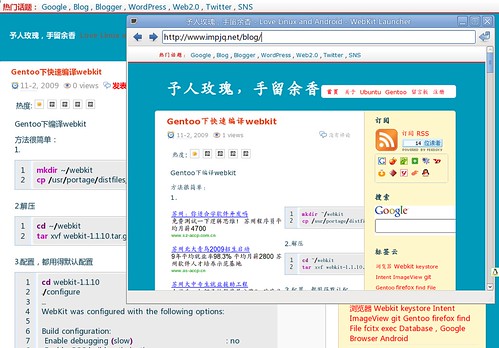
这个简易浏览器的源码在:WebKitTools/GtkLauncher/main.c
pjq@gentoo-pjq ~/webkit/webkit-1.1.10 $ cat WebKitTools/GtkLauncher/main.c
/*
 * Copyright (C) 2006, 2007 Apple Inc.
 * Copyright (C) 2007 Alp Toker
 *
 * Redistribution and use in source and binary forms, with or without
 * modification, are permitted provided that the following conditions
 * are met:
 * 1. Redistributions of source code must retain the above copyright
 *    notice, this list of conditions and the following disclaimer.
 * 2. Redistributions in binary form must reproduce the above copyright
 *    notice, this list of conditions and the following disclaimer in the
 *    documentation and/or other materials provided with the distribution.
 *
 * THIS SOFTWARE IS PROVIDED BY APPLE COMPUTER, INC. ``AS IS'' AND ANY
 * EXPRESS OR IMPLIED WARRANTIES, INCLUDING, BUT NOT LIMITED TO, THE
 * IMPLIED WARRANTIES OF MERCHANTABILITY AND FITNESS FOR A PARTICULAR
 * PURPOSE ARE DISCLAIMED.  IN NO EVENT SHALL APPLE COMPUTER, INC. OR
 * CONTRIBUTORS BE LIABLE FOR ANY DIRECT, INDIRECT, INCIDENTAL, SPECIAL,
 * EXEMPLARY, OR CONSEQUENTIAL DAMAGES (INCLUDING, BUT NOT LIMITED TO,
 * PROCUREMENT OF SUBSTITUTE GOODS OR SERVICES; LOSS OF USE, DATA, OR
 * PROFITS; OR BUSINESS INTERRUPTION) HOWEVER CAUSED AND ON ANY THEORY
 * OF LIABILITY, WHETHER IN CONTRACT, STRICT LIABILITY, OR TORT
 * (INCLUDING NEGLIGENCE OR OTHERWISE) ARISING IN ANY WAY OUT OF THE USE
 * OF THIS SOFTWARE, EVEN IF ADVISED OF THE POSSIBILITY OF SUCH DAMAGE.
 */

#include
#include

static GtkWidget* main_window;
static GtkWidget* uri_entry;
static GtkStatusbar* main_statusbar;
static WebKitWebView* web_view;
static gchar* main_title;
static gdouble load_progress;
static guint status_context_id;

static void
activate_uri_entry_cb (GtkWidget* entry, gpointer data)
{
    const gchar* uri = gtk_entry_get_text (GTK_ENTRY (entry));
    g_assert (uri);
    webkit_web_view_load_uri (web_view, uri);
}

static void
update_title (GtkWindow* window)
{
    GString* string = g_string_new (main_title);
    g_string_append (string, " - WebKit Launcher");
    if (load_progress  1 ? argv[1] : "http://www.google.com/");
    webkit_web_view_load_uri (web_view, uri);

    gtk_widget_grab_focus (GTK_WIDGET (web_view));
    gtk_widget_show_all (main_window);
    gtk_main ();

    return 0;
}
主要就调用了三个函数:
    gtk_box_pack_start (GTK_BOX (vbox), create_toolbar (), FALSE, FALSE, 0);
    gtk_box_pack_start (GTK_BOX (vbox), create_browser (), TRUE, TRUE, 0);
    gtk_box_pack_start (GTK_BOX (vbox), create_statusbar (), FALSE, FALSE, 0);
分别创建了toolbar,browser,statusbar.
以后应该就可以用这个来调试WebKit了。 这个WebKit应该只是针对GTK的精简版了,完整版比这个复杂多了。 以后再研究一下完整版的编译过程。
